After the interest from people as to how the model I think I'll dedicate a few of my posts to explaining how I made few of my models. Lets start by doing a short and sweet explanation of 3D modeling. No technical stuff here, just the bare bones of what a 3D model is.
First how many of you know what a CG/3D model is? No one, what a shame. Well a good way to describing what a 3D model is, (at least for me) is to compare them to ceramics. To create a ceramic vase or figure you need some raw material to work with, namely clay. Then with a set of tools you shape this material, into a specific form. Well in 3d modeling the process is rather similar. The way the program works is that it acts like a digital sculpture room, or a digital/algorithmic potter's wheel. In the program your objective then is to create a three dimensional object that is made out of digital stuff (1's and 0's) instead of being composed of real stuff (atoms). As a side note, there are companies out there with printers that take these digital objects and make them into real life objects, called rapid prototypes, so the idea that the 3D model is simply digital or "not real" is a complex one. And just like in ceramics where you can create a vase by either hand building it by using coils or making it in a potter's wheel, the options of creating a specific object in 3D modeling software varies in technique and complexity.
Lets introduce you now to what this software looks like:
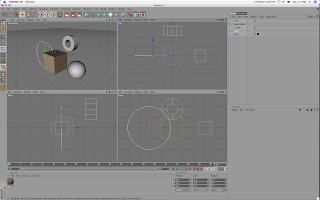
Cinema 4d. 3d modeling/animating software.
Now of this is a "digital sculpture room" like I said before there are a few things that have to be present. The first one is the room itself where the sculpture is present. This are the four squares (viewports) at the center of the image. Each square gives a different viewpoint of the "digital room" and lets the artist look around the space and the object like they would in real life (imagine the modeler/animator as a mechanic that needs to look underneath a car to fix it).
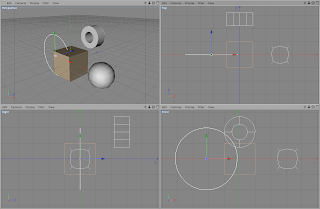
The Digital room. The place where the work gets done.
Another thing that seems missing from the "digital sculpture room" is the artist. Well the artist is outside the image, sitting on a chair, but this obviously doesn't stop him/her from manipulating or getting hands on with the objects you see on the four squares. For this they employ the tools that you see on the toolbars (yeah I'm referring to those icons or images you see) to the top and the left. Some of the things here act like hands that let you move things around, others let you stretch or shape the object in different ways, and others even let you add more materials to the scene (like a ceramicist that realizes that they need more clay).
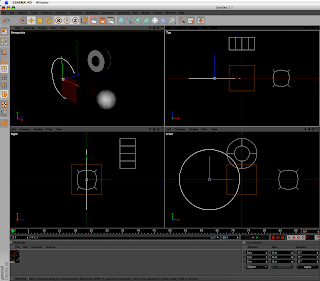
The toolbars... I know of at least 4 ways of accessing each function the images represents
To the right you see a box that says "Objects" and has a list object underneath. Well any responsible artist has a list of their material they are using so here's your digital one. And underneath that you see a box that says "Attributes". Well this space tells you some details of what object you have selected, like the position of the object, its size, etc.
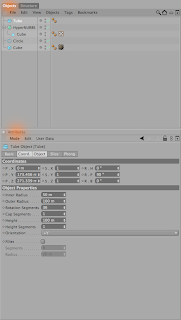
Lets recap. By now I've covered where the objects are, where the artist is, where their tools are and where they get information about their objects. And I still haven't even told you how you would do the actual work! Amazing! Well lets talk more about that some other time. Right now I need some domestic iussues to take care of (did you know that if you don't eat you get hungry and can't work as effectively? Well I keep forgetting that).


