Showing posts with label 3D. Show all posts

How do I model?

Monday, February 25, 2008

Hello, I'm finally back in business. My last few posts have not been project based, and this one's not going to be different. The reason for this? Well, firstly, there is the issue that there has not been much progress made, mainly due to a combination of senioritis, depression, and stress. I really don't want to bore you with details and ranting about my deficiencies as to why I am not working as hard as I should. It's just happening and I need to get over it.

Do you remember that post from February 16th??? I do. And I remember that I needed to explain how I modeled my objects. Well I'll give you the basic rundown of the overall process. Hopefully no one will get lost. To create my models I generally use a cube inside a hypernurb and mold and extrude the shape I want out of that. Ok, let me explain how a hypernurb works, because i hope you already know what a cube, extrude, and mold mean. A hypernurb takes a shape (in most of my cases a cube) and smothes the edges of the object.


The object on the left is in a hypernurb the one on the right is not.

I you look at the box that says objects, you can see the first cube is in a way inside the hypernurb. This tells you that this object is affected by the parent object (the hypernurb). The other cube object (the one on the right) is actually the same one as the left one only this one is not placed on the hypernurb. The reason I prefer working with these specific tools is that they let me create a single object that can be the animated with less trouble.

How to 3D model according to me

Saturday, February 16, 2008

After the interest from people as to how the model I think I'll dedicate a few of my posts to explaining how I made few of my models. Lets start by doing a short and sweet explanation of 3D modeling. No technical stuff here, just the bare bones of what a 3D model is.

First how many of you know what a CG/3D model is? No one, what a shame. Well a good way to describing what a 3D model is, (at least for me) is to compare them to ceramics. To create a ceramic vase or figure you need some raw material to work with, namely clay. Then with a set of tools you shape this material, into a specific form. Well in 3d modeling the process is rather similar. The way the program works is that it acts like a digital sculpture room, or a digital/algorithmic potter's wheel. In the program your objective then is to create a three dimensional object that is made out of digital stuff (1's and 0's) instead of being composed of real stuff (atoms). As a side note, there are companies out there with printers that take these digital objects and make them into real life objects, called rapid prototypes, so the idea that the 3D model is simply digital or "not real" is a complex one. And just like in ceramics where you can create a vase by either hand building it by using coils or making it in a potter's wheel, the options of creating a specific object in 3D modeling software varies in technique and complexity.

Lets introduce you now to what this software looks like:
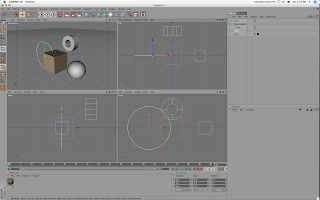

Cinema 4d. 3d modeling/animating software.

Now of this is a "digital sculpture room" like I said before there are a few things that have to be present. The first one is the room itself where the sculpture is present. This are the four squares (viewports) at the center of the image. Each square gives a different viewpoint of the "digital room" and lets the artist look around the space and the object like they would in real life (imagine the modeler/animator as a mechanic that needs to look underneath a car to fix it).
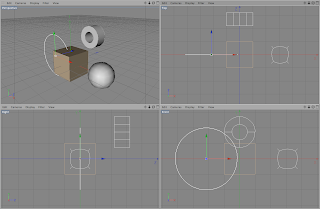

The Digital room. The place where the work gets done.

Another thing that seems missing from the "digital sculpture room" is the artist. Well the artist is outside the image, sitting on a chair, but this obviously doesn't stop him/her from manipulating or getting hands on with the objects you see on the four squares. For this they employ the tools that you see on the toolbars (yeah I'm referring to those icons or images you see) to the top and the left. Some of the things here act like hands that let you move things around, others let you stretch or shape the object in different ways, and others even let you add more materials to the scene (like a ceramicist that realizes that they need more clay).
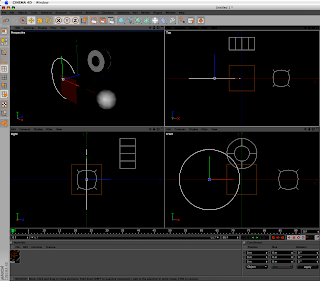

The toolbars... I know of at least 4 ways of accessing each function the images represents

To the right you see a box that says "Objects" and has a list object underneath. Well any responsible artist has a list of their material they are using so here's your digital one. And underneath that you see a box that says "Attributes". Well this space tells you some details of what object you have selected, like the position of the object, its size, etc.
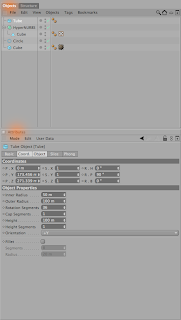


Lets recap. By now I've covered where the objects are, where the artist is, where their tools are and where they get information about their objects. And I still haven't even told you how you would do the actual work! Amazing! Well lets talk more about that some other time. Right now I need some domestic iussues to take care of (did you know that if you don't eat you get hungry and can't work as effectively? Well I keep forgetting that).

Second model

Thursday, February 14, 2008

Here we have a few images from my second model.

sanchi stupa model 1

This model is the one representing the Sanchi style of stupas.

Sanchi stupa model 3

And here's a detail shot of the top of the structure. A more substantial post (and maybe a rant) will come later on tonight.

Storyboards, Models, Videos: it's all interesting

Thursday, February 7, 2008

Well I'll say! That story board video is taking its time! The reason is that I have to fix each image so that it looks well on the video (yeah, yeah, I know people may say that I suck at drawing but that's really not the point here). So that's coming slowly.

But, I did start my work on the models of the three stupas I'm using on the video. I've already uploaded on Flickr two images of the first stupa I started working on.

Tibetan Stupa model

This is the first render I made of the model of the Tibetan stupa. The reason it looks black and white is because it doesn't have any texture (or colored light for that matter). I find this image useful because it lets me see the lighting on it more easily. The lighting scheme is a three point lighting scene, with a main light on the front left (your left), a spot light on the back for highlights, and a filler light on the right.

Tibetan stupa with texture

This is the second render of the model. This one has a simple bump map texture with some color added. Even though you can see most of the shadows and highlights the previous one, it just doesn't feel right without some sort of texture on the model. I'm not planning on leaving the texture as it looks right now, though truth be told I don't know what approach I'll go with it. I think I can go either with a more cell shaded look or a more realistic texture for the model... ah options.

Actually there are several things I have to fix in the model itself to make it look more authentic. For example the spire needs a lot more work to get the curves and details in order (the curved pointy thing at the top is supposed to be a crescent moon... yeah I know... not there yet). But overall it looks pretty well for just two days of work. Actually I threw out the model I started yesterday and I started this one at 6:00 am today.

Right now I'm waiting for a flyby video of this model to render. For those of you who don't know, rendering is a lot like watching grass grow, only the grass is a video. So this post has been a welcome relief from the potential mental breakdown I might have from watching the render of my video.

So lets see what do I owe you? The storyboard video, the flyby and I think a post about computer modeling seems in order (specially after my "render" rant). If anyone out there has any doubts, questions, inquiries, or are just plain interested in anything about the project, the process of making a video or how I stay sane in a computer lab just leave a comment and I'll try to answer to the best of my ability.

Plans for the night and the project.

Thursday, January 17, 2008

Well, I think I've let my classes, blog and my project lag too much. So I've decided to do an all-nighter tonight and inject some work on my stuff. So what are the plans? Well, first to start populating my flickr account (yes I have Flickr, its awesome) with some material. In fact this image comes from my flickr account. Its a 3D model of the installation I'll be constructing during Spring of '08, to use as a projection screen for the video I'll be making now on winter of '08.

Also, I decided to go to the Jason Salovon talk at the Columbus Museum of Art, because really when you decide to do an all-nighter you just have to go to a 7 pm lecture right before working (its not as if I have hours before my proposal is due). Actually a very interesting artist, his work is very concept based, and works with ideas such as reformatting information or data in new visual ways. Maybe I should do a more thorough post of his work later on, see how it compares to my work and what I can learn from him.

I am also going to write a proper proposal for the video part of this project, do sketches/story-board, scan these sketches, and probably do a video with these sketches (and of all these things I think the video could take the least amount of time... or at least it feels that way). Well I'm off to several hours of reading, writing and drawing, wish me luck

 
Stupas in Video - Templates para novo blogger